

In this chapter you will learn how to reflect an image.
CSS Image Reflections
The box-reflect property is used to create an image reflection.
The value of the box-reflect property can be: below, above, left , or right.
Browser Support
The numbers in the table specify the first browser version that fully supports the property.
Numbers followed by -webkit- specify the first version that worked with a prefix.
| Property | Google Chrome | Internet Explorer | Mozilla Firefox | Safari | Opera |
|---|---|---|---|---|---|
| box-reflect | 4.0 -webkit- | 79.0 -webkit- | Not supported | 4.0 -webkit- | 15.0 -webkit- |
Examples
Example
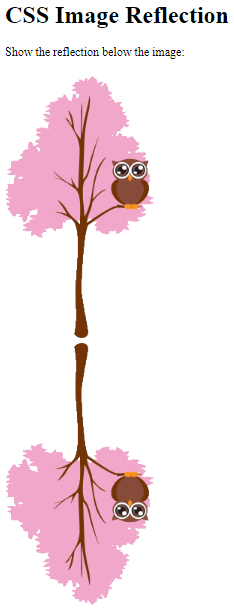
Here we want the reflection below the image:
<!DOCTYPE html>
<html>
<head>
<style>
img {
  -webkit-box-reflect: below;
}
</style>
</head>
<body>
<h1>CSS Image Reflection</h1>
<p>Show the reflection below the image:</p>
<img src="img_tree.png">
</body>
</html>
Result:
Example
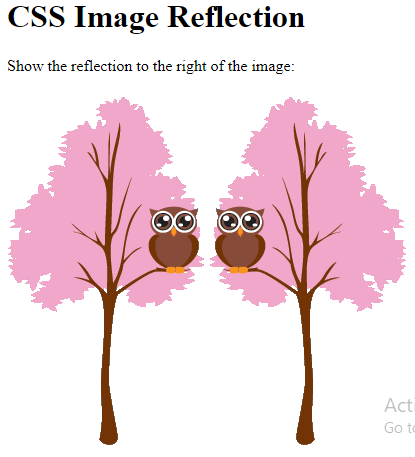
Here we want the reflection to the right of the image:
<!DOCTYPE html>
<html>
<head>
<style>
img {
  -webkit-box-reflect: right;
}
</style>
</head>
<body>
<h1>CSS Image Reflection</h1>
<p>Show the reflection to the right of the image:</p>
<img src="img_tree.png">
</body>
</html>
Result:
CSS Reflection Offset
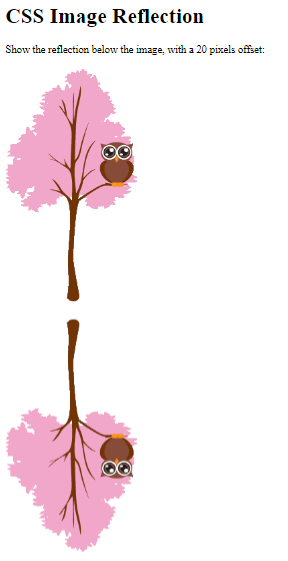
To specify the gap between the image and the reflection, add the size of the gap to the box-reflect property.
Example
Here we want the reflection below the image, with a 20px offset:
<!DOCTYPE html>
<html>
<head>
<style>
img {
  -webkit-box-reflect: below 20px;
}
</style>
</head>
<body>
<h1>CSS Image Reflection</h1>
<p>Show the reflection below the image, with a 20 pixels offset:</p>
<img src="img_tree.png">
</body>
</html>
Result:
CSS Reflection With Gradient
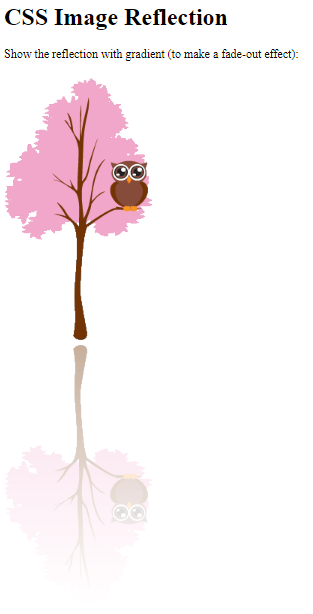
We can also create a fade-out effect on the reflection.
Example
Create a fade-out effect on the reflection:
<!DOCTYPE html>
<html>
<head>
<style>
img {
  -webkit-box-reflect: below 0px linear-gradient(to bottom, rgba(0,0,0,0.0), rgba(0,0,0,0.4));
}
</style>
</head>
<body>
<h1>CSS Image Reflection</h1>
<p>Show the reflection with gradient (to make a fade-out effect):</p>
<img src="img_tree.png">
</body>
</html>
Result: